AI & Software Studio

We build AI agents, websites and software that help businesses get work done.

JJ Works works with founders, small and mid-sized businesses, and operations teams to turn slow, repetitive or unclear work into tools people actually use — and to bring more of the right customers to them.

Start with a short email describing the problem. No forms, no sales funnel.

How a request moves through an assisted workflow Four connected stages: a request arrives, its details are organized, a draft reply is prepared, and a person reviews it before anything is sent. Request arrives email · form · ticket Details organized customer · items · date Draft prepared from approved sources A person approves then it's sent

See it step by step

What an assisted workflow looks like

Step through a simplified version of the distributor example below. The assistant does the reading and lookups; a person stays in charge of what gets sent.

This demo runs entirely in your browser. It doesn't use an AI service, send messages, or connect to any system.

Simulation · fictional sample data · nothing is sent or changed

Step 1 of 4 Request received

A new email arrives in the shared sales inbox.

From: Purchasing, Kestrel Fixtures

Subject: Quote — brackets

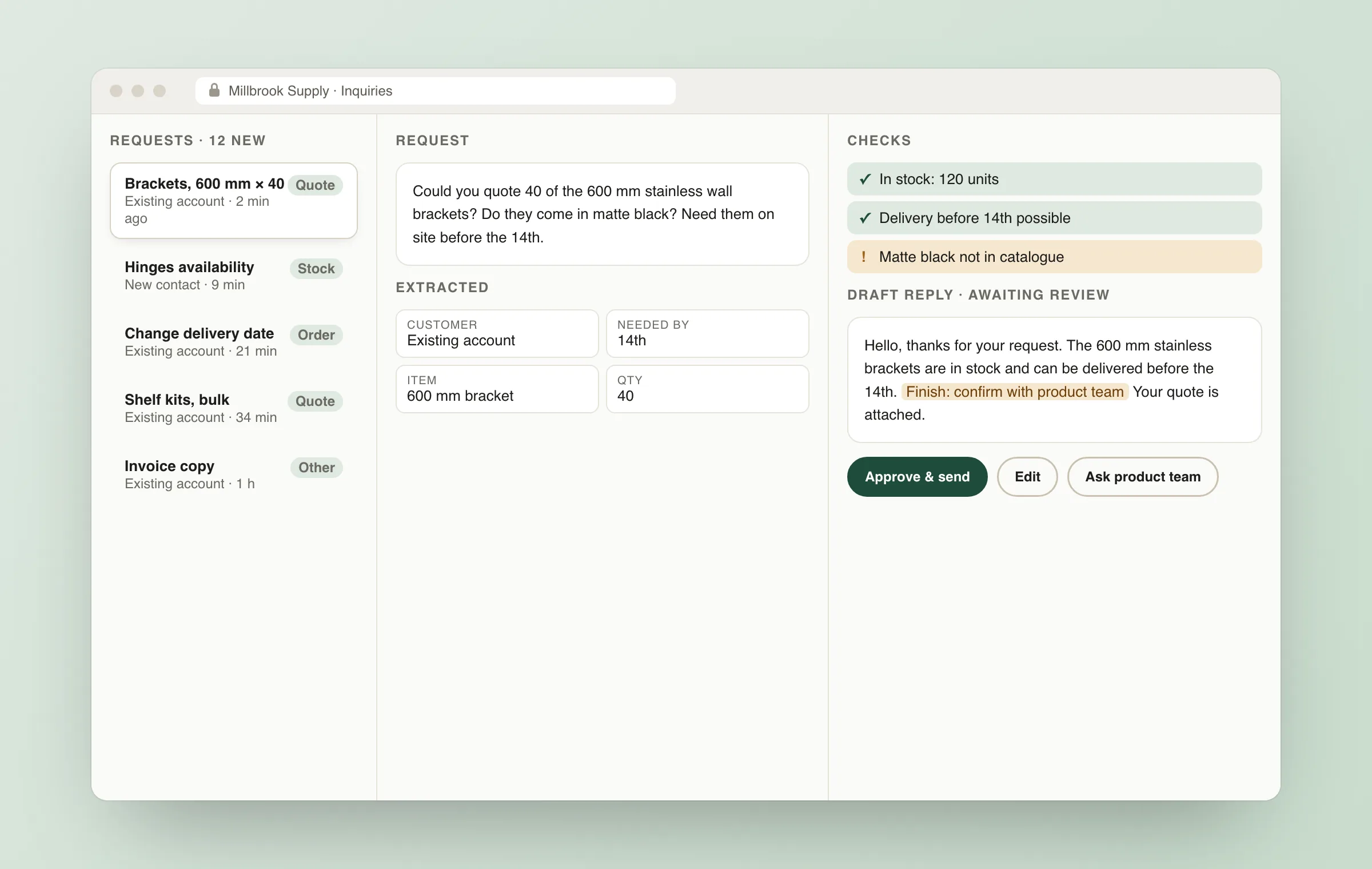
Hi, could you quote 40 of the 600 mm stainless wall brackets? Do they come in matte black? We need them on site before the 14th. Also, is the 900 mm version still available?

Step 2 of 4 Information organized

The assistant pulls out what matters and matches it to the customer record.

Type
Quote request
Customer
Sample Fixtures Co. · existing account
Item 1
600 mm stainless wall bracket × 40
Question
Matte black finish available?
Item 2
900 mm bracket — availability
Needed by
Before the 14th

Step 3 of 4 Draft prepared

It checks the approved product list and drafts a reply. Anything it can't confirm is flagged, not invented.

  • 600 mm stainless bracket — 120 in stock (sample data)
  • 900 mm bracket — available, 5-day lead time (sample data)
  • Matte black finish — not found in the product list. Needs a person to confirm.

Hello, thanks for your request. The 600 mm stainless brackets are in stock and can be delivered before the 14th. The 900 mm version is available with a 5-day lead time. [Finish: to be confirmed by product team] Your quote is attached for review.

Step 4 of 4 Human review

Nothing is sent automatically. A team member reviews the draft and decides what happens next.

Choose an action to see what would happen in a real system.

Example solutions

What we could build for you

Three examples of the kind of work we do. They describe possible solutions, not completed client projects.

Illustrative solution concept

An inquiry assistant for a distributor

Problem
Sales staff spend much of the day reading emailed quote requests, looking up part numbers, stock and specifications across several systems, and typing replies.
Proposed solution
An assistant reads each request, identifies the customer and the items asked for, looks up approved product and stock information, and prepares a draft reply. Anything it can't match is highlighted, not guessed.
Intended benefit
Staff start from a prepared draft instead of a blank email. They spend their time on judgement — pricing, exceptions, relationships — rather than lookups.

Illustrative solution concept

A document workflow for a professional-services firm

Problem
Client documents arrive by email and upload in many formats. Someone has to open each one, copy key details into a system, and chase what's missing.
Proposed solution
A workflow extracts the relevant fields, checks them against a list of what each case needs, flags missing or unclear items, and routes exceptions to the right person with the context attached.
Intended benefit
Less manual data entry, fewer cases stalled by a missing page, and a clear record of what was checked and who handled each exception.

Illustrative solution concept

A customer portal for a growing business

Problem
Customers email and call to ask where their order, request or project stands. Answers live in spreadsheets and inboxes, so every update takes a search.
Proposed solution
A secure web portal where each customer signs in to see their requests, shared documents and current status, updated from the systems the team already uses.
Intended benefit
Customers can check progress themselves, and the team answers fewer status questions and can focus on work that needs a person.

How we work

A clear process, with a decision at every stage

Each stage ends with something you can review. You decide whether to continue, adjust or stop before the next one begins.

  1. 1

    Understand the problem

    We talk through how the work happens today, where time is lost, and what tools and data are involved.

    You get A shared, written summary of the problem.

  2. 2

    Define scope and success

    We agree what the first version will and won't do, how we'll know it's working, and what it will cost.

    You get A written scope you approve before work starts.

  3. 3

    Build and review

    We build a focused first version and review it with you early, using real examples from your work.

    You get A working version you can try, not just slides.

  4. 4

    Test and launch

    We test with realistic cases, including the awkward ones, then launch with the people who will use it.

    You get A launched system and short handover notes.

  5. 5

    Improve and support

    We watch how it's used, fix what needs fixing, and plan the next improvements if they're worth making.

    You get A list of what to improve next, if anything.

Ways to engage

Start where it makes sense

Scope, timing and cost are agreed in writing once we understand the project — there's no one-size package. Most work fits one of these three.

Option 1

Discovery and planning

Best when You have a problem or idea and want to know what's worth building.

  • Conversations with the people who do the work
  • A recommended approach, including simpler options
  • A written scope and cost for a first version

Option 2

Project design and development

Best when You know what you need and want it designed, built and launched.

  • Design and development in short review cycles
  • Testing with realistic examples
  • Launch, handover notes and access you control

Option 3

Ongoing improvements and support

Best when Something is live and you want it maintained and improved over time.

  • Fixes and small changes as needs come up
  • Updates when connected tools change
  • Periodic review of what to improve next

For website projects: we can often prepare a working preview of a rebuilt site first, so you can judge the result before deciding to publish it.

FAQ

Common questions

Something else on your mind? Ask us by email.

What kinds of projects can we discuss?

AI assistants, workflow automations, websites, web applications, customer portals, internal tools, early product versions, and marketing such as local search, email campaigns and landing pages. Smaller questions are welcome too, such as whether a process is a good fit for AI at all, or what to fix on an existing website. If a project isn't a good fit for us, we'll say so.

Can you work with tools we already use?

Often, yes. Many business tools can exchange information through built-in integrations, exports or APIs (connections that let software talk to other software). Before promising an integration, we check what your specific tools and plans allow, and explain the options if a direct connection isn't possible.

Do we need a complete specification?

No. A description of the problem, how it's handled today, and what a better result would look like is enough to start. Turning that into a clear scope is part of our work.

How are scope and pricing determined?

After we understand the project, we propose a scope, approach and cost in writing. You decide whether to go ahead before any build work begins. Larger projects can be split into stages, so you can stop or change direction between them. We don't publish a price list because projects vary widely.

How are access permissions and sensitive information handled?

We ask only for the access a task needs, prefer accounts and keys that you own and can revoke, and avoid copying sensitive data when it isn't necessary. How data is handled is agreed before work starts. If your business has specific requirements — such as a confidentiality agreement or an internal security policy — raise them in your first message so we can discuss them.

What happens after launch?

We agree this up front. Options include handover notes so your team can run things independently, a period for fixes after launch, or ongoing support and improvements. AI-based features in particular benefit from occasional review as real usage reveals new cases.

Start with an email

Tell us what you'd like to get done.

Tell us what's slowing your team down, which tools you use today, and what a good result would look like. A few sentences is enough.

We're setting up our project inbox. In the meantime, see what to include when you get in touch.